|
Reports Menu > Payroll > Leave Liability Report |

The Leave Liability Report allows users with access to generate a report displaying the leave liabilities for employees forecast to a specific date using a selection of parameters.
Leave Liability Report Screen
Parameter Name |
Description |
Liability At or Forecast To |
The date to view what the leave liability was as at that date, or the date to forecast leave liabilities up to based on the employees leave rate codes and standard hours. |
Leave Type |
The leave type or click |
Starting Emp Code Ending Emp Code Selected Employees Starting Department Ending Department Selected Departments Show Multi-Dep't Employees Starting Pay Point Ending Pay Point Selected Pay Points Starting Cost Centre Ending Cost Centre Selected Cost Centres |
Parameters to restrict the employees you wish to see on the report. |
Sort By |
Cost Centre - The report will sort and display by cost centre. Department - The report will sort and display by department. Pay Point - The report will sort and display by pay point. |
 to search. Leave blank to include all leave types.
When the required parameters have been entered, the Leave Liability Report will be generated.
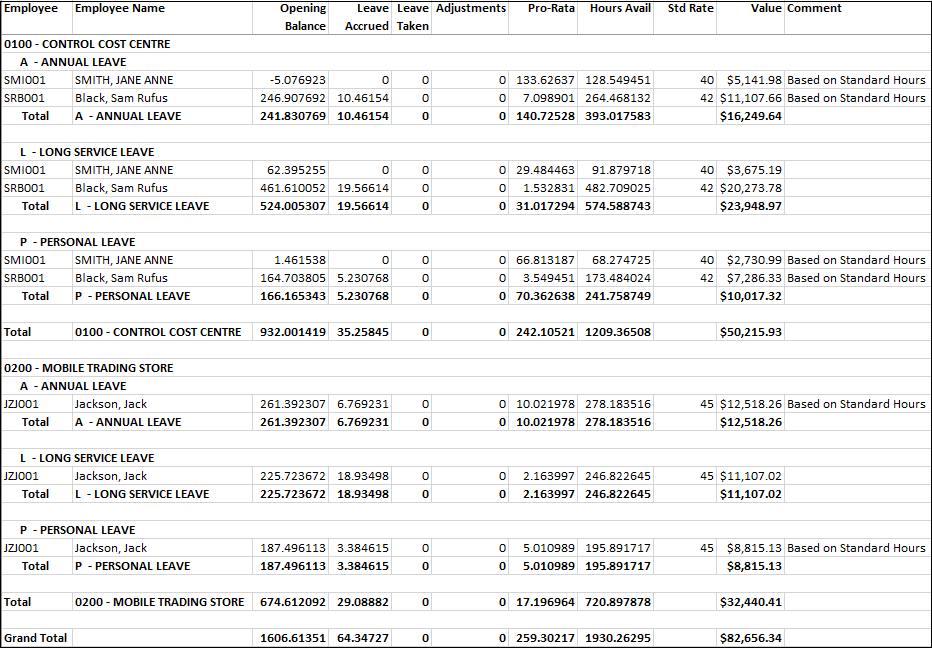
Example of Leave Liability Report
