|
Main Menu > Debtors > End of Period/Year > Print/Send Debtors Statements |

The Debtors Statement Printing program is used to generate Debtors statements. Users can select from a range of parameters to determine which customers a statement will be generated for.
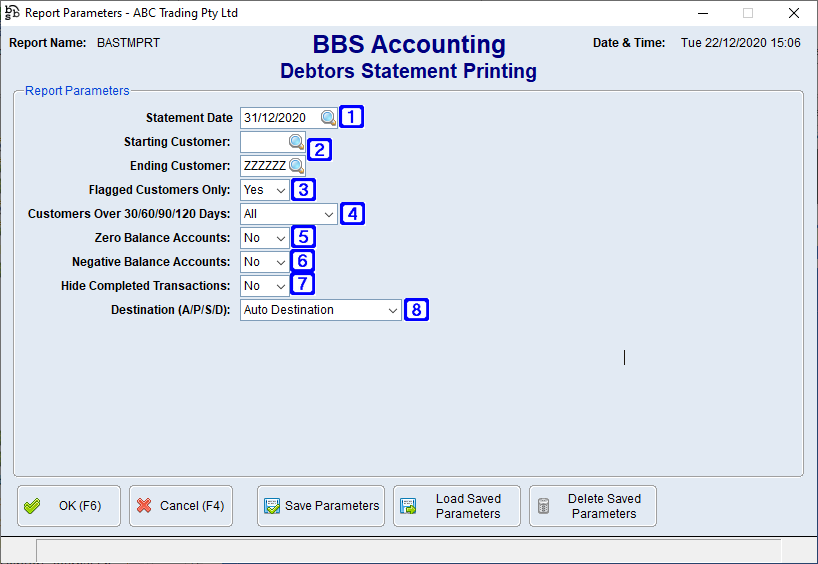
Debtors Statement Printing Screen
|
Statement Date – This is the end date of the statement and will only show transactions up to and including this date. |
|
Starting Customer - Leave blank if printing statements for all customers otherwise enter the customer code or click Ending Customer – Leave ZZZZZZ if printing statements for all customers otherwise enter the customer code or click |
|
Flagged Customer Only: •Yes - Will only generate statements for customers where the 'Generate Statement' box is ticked in Customer Masterfile Maintenance. •No - Will generate statements for all customers. |
|
Customers Over 30/60/90/120 Days: •All - Will include all customers regardless of ageing •30 Days - Will only include customers where there is an ageing balance in 30 days or above •60 Days - Will only include customers where there is an ageing balance in 60 days or above •90 Days - Will only include customers where there is an ageing balance in 90 days or above •120+ Days - Will only include customers where there is an ageing balance in 120+ days |
|
Zero Balance Accounts: •Yes - Will generate statements for all customers including those with a zero balance •No - Will only generate statements for customers with a balance owing |
|
Negative Balance Accounts: •Yes - Will generate statements for customers with a negative balance •No - Will only generate statements for customers with a positive balance |
|
Hide Completed Transactions: •Yes - Will generate statements showing only open items •No - Will generate statements showing open and closed items for the statement period |
|
Destination (A/P/S/D): •Auto Destination - Sends the generated statements to the document destination set up for the customer in Customer Masterfile Maintenance. •Printer - Sends the generated statements to the selected printer •Screen (PDF) - Displays the generated statements in PDF format on users screen •File Copy Only (PDF) - Generates a PDF only of the statements which can be located under the Debtors (F6) section in the Statements tab of the Global Customer Enquiry. |


 to search for the customer code you wish to start printing statements from.


